My home network already blocks ads with an ESP32-C3. It runs esp32-c3-adblock by M-Abozaid, an Arduino C++ firmware that keeps a large blocklist as hashes in flash and needs about 50 KB of RAM to do it. Its web page, though, only shows a counter per client, and I wanted to see what my devices were actually looking up, which domains got blocked, and which ones were busiest. I also wanted IPv6, local names like nas.home, and a resolver that keeps answering when an upstream or its own storage misbehaves.
So I wrote a successor in Rust. C3-DNS is a network-wide DNS ad blocker for the ESP32-C3, MIT licensed, and version 0.1.0 installs from your browser in about a minute with no toolchain.
Table of contents
Open Table of contents
What C3-DNS does
You point your router’s DHCP at the board, and every device on the network uses it as its DNS server. Names on the blocklist get 0.0.0.0 (or :: for IPv6), so apps fail fast instead of waiting for a timeout. Everything else goes to Quad9 or Cloudflare, with failover between them, and the answer is cached.
The feature list, in short:
- A blocklist in its own flash partition with room for about 400,000 domains. Listing
ads.examplealso blocksx.ads.example. - Your own block and allow rules in the web UI: exact names, a domain with all its subdomains, and
*wildcards. Allow always wins. - CNAME uncloaking: a tracker hidden behind an innocent-looking first-party name is still blocked.
- Local DNS records (
nas.home→192.168.1.10, up to 100), and the board answers toadblock.localover mDNS. - A and AAAA over UDP and TCP, for IPv4 and IPv6 clients.
- A serve-stale cache, so a short upstream outage goes unnoticed.
- A live query log, top allowed and top blocked domains, per-device counts, and daily summaries for the last 7 days that survive a reboot.
- Pause blocking for 30 seconds, 5 minutes or 30 minutes, and ban a single device outright.
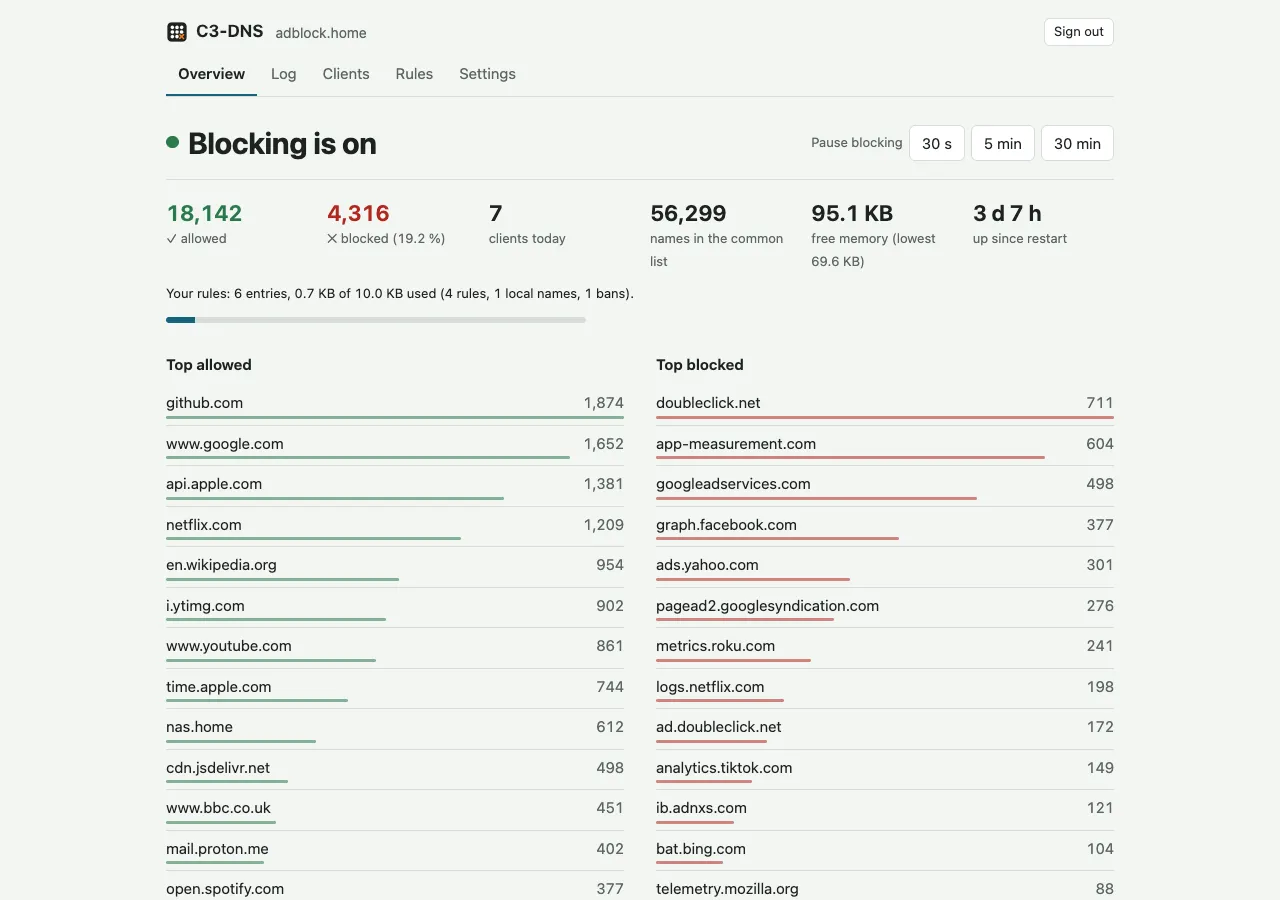
The overview tab. Screenshots use made-up data.
Why an ESP32-C3 instead of a Raspberry Pi
A Pi-hole on a Raspberry Pi is the usual answer to “block ads for the whole house”, and it is a good one. The ESP32-C3 drops the SD card and the operating system you have to keep patched: it is a RISC-V microcontroller on a board the size of a thumb, powered from any USB port or phone charger.
The price is memory. The C3 has 400 KB of SRAM, 4 MB of flash and no PSRAM. On my board, starting Wi-Fi, the HTTP server and mDNS took free heap from 259 KB down to 183 KB before a single DNS query had been handled. Those 183 KB have to hold the cache, the query log, the rules, the web UI and every packet in flight.
Storing the blocklist as hashes in flash
The central trick comes from esp32-c3-adblock, and C3-DNS keeps its file format byte for byte, so an existing blocklist.bin works unchanged. Each domain is hashed with 64-bit FNV-1a, truncated to 40 bits, and stored as 5 bytes. The hashes are sorted and written to a 1,984 KB flash partition that the firmware memory-maps read-only at boot.
A lookup is a binary search over that mapped flash. For a 121,000-domain list that is about 17 reads, and I measured 40 µs per search on the device (1,000 searches, half of them hits, with the flash still at 40 MHz). The list costs no RAM beyond the mapping. The partition holds 406,323 domains when full; a 121,044-domain list uses about 0.6 MB of it.
For a.b.ads.example.com the device checks the full name, then b.ads.example.com, ads.example.com, example.com and com, and stops at the first hit. Forty-bit hashes can collide: the chance that a given unlisted name matches one entry in a 121k list is about 1 in 9 million per check. An allow rule fixes any false block.
Release images ship StevenBlack’s unified hosts list (adware and malware, about 56,000 domains, MIT). A bundled Rust tool builds a bigger image from any hosts files or domain lists, including GPL-licensed ones like Hagezi’s, since you build that one yourself:
cd dnscore
cargo run --release --example build_blocklist -- ../my-list.bin hosts light-onlydomains.txt
The query path
Every query goes through admission first. It must come from the board’s own LAN (its IPv4 subnet, IPv6 link-local or unique-local addresses, or the global /64 prefixes it learned through SLAAC), so C3-DNS can never become an open resolver. After that come a per-client token bucket (burst 50, 20 queries a second by default), a global one and a low-heap guard. Over-limit queries are dropped and counted, never refused, so a flooding client has nothing to amplify.
The decision engine then stops at the first match:
| # | Check | Result |
|---|---|---|
| 1 | Client is banned | No answer at all |
| 2 | Name is the board’s own (adblock.home) | Its own addresses |
| 3 | Blocking is paused | Forward (cache skipped) |
| 4 | A custom allow rule matches | Forward |
| 5 | A local DNS record matches | The record’s addresses |
| 6 | A custom block rule matches | Blocked |
| 7 | The name or a parent is in the blocklist | Blocked |
| 8 | Otherwise | Forward to upstream |
Forwarding uses one UDP socket with random query IDs and 0x20 case randomisation, and replies are matched on ID, upstream and the exact question. The socket gets a new port every 60 seconds or 2,000 sends. Each upstream gets 800 ms before the next one is tried. If all of them fail, an expired cache entry up to 6 hours old is served with a 30-second TTL, so clients retry soon after the upstream comes back.
After an upstream answer, every name in the CNAME chain is checked against the rules and the blocklist. If any member is blocked and none is allowed, the whole answer is replaced with a blocked one. I saw this catch real cloaked tracker names on the board whose own names are not on the list.
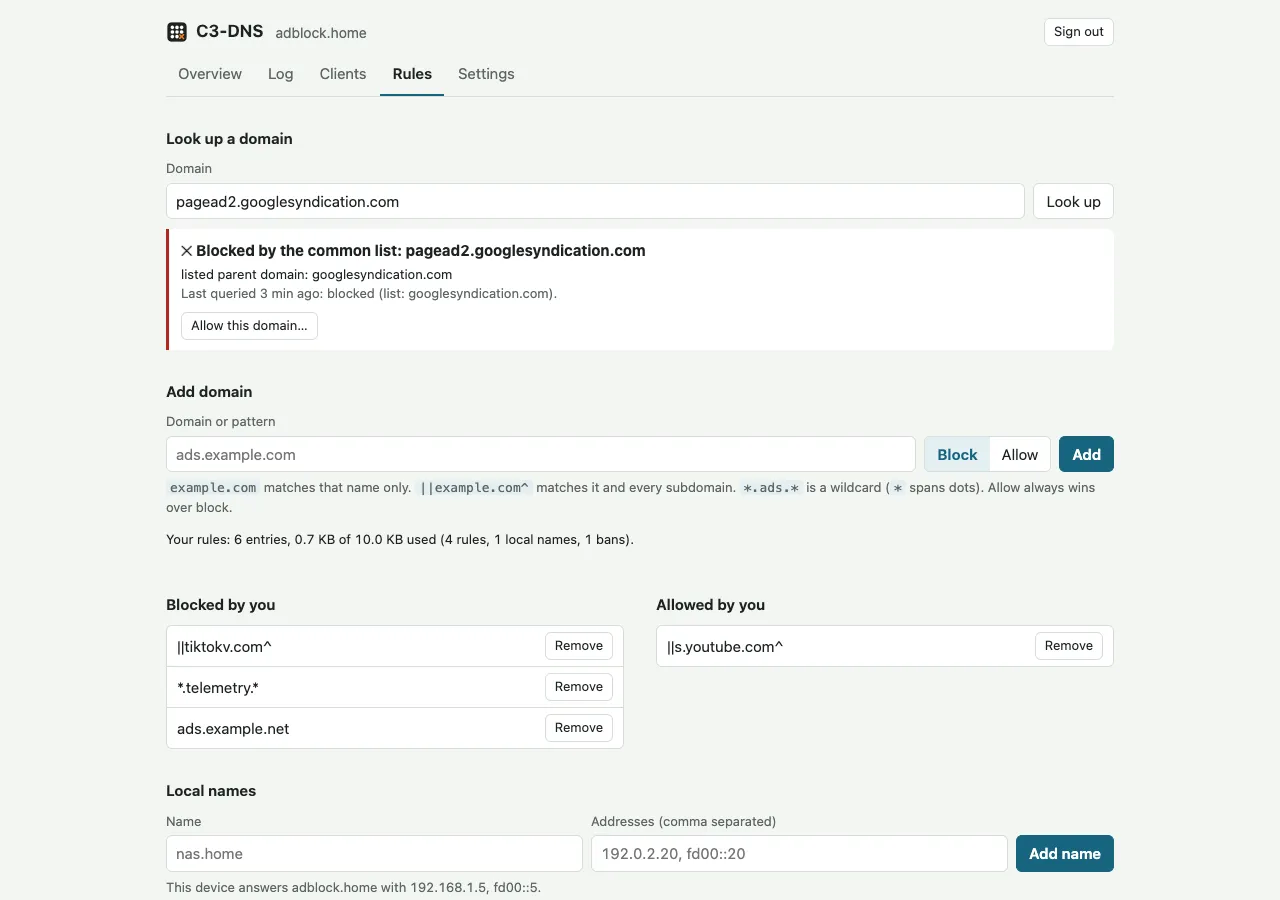
The rules tab. The lookup box tells you whether a name is blocked and by what: a rule, the list, or a parent domain.
Memory: what I measured on the board
A DNS server that runs out of memory takes the whole household’s internet with it, so I measured heap under load before settling any buffer size. Everything here was run on real hardware:
| Condition | Lowest free heap |
|---|---|
| Idle after boot | about 107 KB |
| 30 queries/s of never-cached names, rule budget full | about 73 KB |
| Same, with one browser polling the web UI | 55.7 KB |
| Same, with two UI clients streaming the query log at once | 49.2 to 51.4 KB |
| 400 queries/s flood of upstream misses (before the web UI) | 37.7 KB |
Below 52 KB free, new queries are dropped so a burst can’t push the allocator into an out-of-memory crash. Two concurrent UI clients under load touch that guard (zero or one dropped query a minute); with three connections the heap fell to 47.2 KB and 18 queries were dropped, which is why the web server now allows two. In the 30-queries-a-second test with no UI open, all 1,800 queries in 60 seconds were answered.
These measurements changed the firmware:
Wi-Fi receive buffers. Every queued Wi-Fi frame pins about 1.6 KB until the application reads it. With ESP-IDF’s default of 32 dynamic RX buffers, a query flood took free heap down to 6 KB. Capping them at 8 fixed it.
Task priorities. The UDP receiver started at priority 10, and lwIP kept preempting it during bursts: only about 60 of a 200-query burst reached the application. It now runs at priority 19, just above lwIP, and only copies each packet into a 128-entry queue. Three worker tasks at priority 10 parse and answer, and the web server sits at priority 5, so DNS keeps working whatever the UI is doing.
Flash clock. Code executes from flash through a cache. espflash’s bundled bootloader ran the flash at 40 MHz, and setting 80 MHz DIO cut the device’s processing time per query from 3.4 ms to 1.9 ms.
Keeping DNS up when storage or power fails
Rules, local records, bans, settings and the 7 daily summaries live in a 512 KB storage partition laid out as a ring of 128 sectors. Each save writes a new CRC-checked record after the newest good one, payload first and header last, and reads it back. A record never takes more than half the ring, so a save never erases the newest good copy. I tested a power cut at every flash operation on the laptop, and wrote prepared corrupt and half-written images to the board to check that it boots with the previous save or with defaults and a warning in the UI. DNS kept answering in every one of those cases.
Saves happen at most once every 10 minutes and only when something changed; nothing is written per query. By my estimate, even the daily maximum of 144 saves erases each sector about once a day.
Wi-Fi credentials and the admin password are kept apart from that ring in NVS. The password is stored as salted PBKDF2-HMAC-SHA256 with 10,000 iterations, which takes about half a second to check on the C3, so a verified login is remembered for 10 idle minutes. The default firmware carries no credentials at all: on first boot it opens a setup Wi-Fi network, C3-DNS-XXXX, where you pick your network and set a password from a phone.
Testing on a laptop, flashing a spare board
The repository has two crates. dnscore holds all the logic: DNS parsing, the decision engine, the blocklist lookup, rules, the cache, rate limiting, the storage ring and the web API parsing. It has no dependencies, forbids unsafe, and runs its tests with cargo test on a Mac in seconds, including randomised mutation tests against the DNS parser, which handles untrusted packets. The firmware crate is a thin layer over ESP-IDF 5.5 through esp-idf-svc: Wi-Fi, sockets, tasks, the HTTP server and flash partitions.
All the hardware work happened on a second board, so the blocker my household depends on was never flashed or touched during development. The flash scripts read the USB board’s MAC address and refuse to flash anything that isn’t the development board.
Before the release I ran a soak test on that board: a script queried five cached names every minute and read the board’s stats. Over about 12 hours and 21,800 queries the board did not reboot, the median answer time over Wi-Fi was 6 or 7 ms in 715 of the 727 samples, and free heap never went below 82 KB.
Install C3-DNS
You need an ESP32-C3 board with 4 MB of flash and a USB port (boards with the C3’s built-in USB, such as the common “SuperMini”, need no driver), a USB cable, Chrome or Edge, and a router where you can set the DNS server it hands out.
- Open the web installer, plug in the board and press Install. On a first install, choose Erase device.
- On a phone, join the open Wi-Fi network C3-DNS-XXXX. The setup page opens (or go to
http://192.168.4.1/). Pick your Wi-Fi and set an admin password of at least 12 characters. - The board restarts and joins your network. Open
http://adblock.local/and sign in asadmin. - Give the board a fixed address in your router (a DHCP reservation), then set that address as the DNS server your router hands out. From any device,
nslookup doubleclick.net <board-ip>should answer0.0.0.0.
Holding BOOT for 5 seconds clears Wi-Fi and the password and restarts into setup. Updating through the installer without erasing keeps your rules and settings. If you’d rather use espflash or esptool, the release page has the images, and docs/building.md covers building from source.
Known limitations
Read these before you rely on it:
- Plain HTTP on your LAN. The admin UI uses Basic auth without TLS, so anyone who can sniff your LAN can see the password. Use one you use nowhere else.
- The setup Wi-Fi is open for up to 15 minutes after the first boot or a BOOT hold. Anyone in radio range during that window could set the device up.
- No DNS-over-HTTPS or DNS-over-TLS, no DNSSEC validation, no DHCP server, no regex rules and no OTA updates. Updates go over USB.
- Upstream health isn’t tracked. When the first upstream stops answering, every query pays its 800 ms timeout before the next one is tried.
- Rules share a 10 KB memory budget with local records and bans, which is about 90 typical rules. The UI shows how much is used.
- Slow web clients can starve DNS. Two or more LAN clients trickling HTTP request bytes can tie up Wi-Fi receive buffers; with three such clients sending a byte a second, only 17 of 45 probe queries were answered.
- It has been tested on one board (chip revision 0.4, 4 MB flash). A physical BOOT-button press and the setup page popping up by itself on iOS and Android are not yet verified on hardware.
FAQ
Is C3-DNS a Pi-hole alternative?
For a home network, it covers the core of what Pi-hole does: network-wide DNS blocking, custom allow and block lists, local DNS records and a dashboard of what each device looks up. It runs on a microcontroller instead of a Linux machine, so it has no DHCP server, no DoH or DoT, a smaller rule budget and a query log that lives in RAM only.
Which ESP32 boards does it support?
ESP32-C3 boards with 4 MB of flash. PSRAM isn’t needed. Other ESP32 chips (the original ESP32, S2, S3, C6) aren’t supported by the current release. If it works on your C3 board, the repository has a board report template.
Does it work with IPv6?
Yes. DNS is served on IPv4 and IPv6, AAAA queries are blocked, cached and forwarded like A queries, and IPv6 upstreams are used once the board has a global IPv6 address. To have clients use it over IPv6, advertise its address through your router’s RDNSS or DHCPv6 settings.
Can I move from esp32-c3-adblock?
Yes. The blocklist format is the same, so your existing blocklist.bin works. The repository has a migration guide.
The source, the design notes with the memory and blocklist measurements, and the issue tracker are at github.com/shivashishrs/c3-dns.